
Creating your own task#
In this section, additional examples on the usage of columnflow are presented.
Writing new tasks#
Despite columnflow already implementing many tasks that satisfy many analysis needs, more complex workflows may require creating a new task, specifically designed to accomplish a new task. This section helps you create your first analysis specific columnflow task and contains some tips that may come in handy.
Tasks in columnflow are based on BaseTask from the law package, which in turn is based on the luigi package by Spotify.
Refer to the documentation of these packages for more information on the task class and a detailed description of the implemented methods.
Example: Task Class#
import luigi
import law

from columnflow.tasks.framework.base import AnalysisTask, SomeOtherTask, Requirements
from columnflow.util import dev_sandbox

class MyTask(AnalysisTask):
    """
    My new task.
    """

    # specify sandbox for the task
    sandbox = dev_sandbox(law.config.get("analysis", "my_columnar_sandbox"))

    # Define a custom name space with which the task is called
    # If not defined cf is usually used as default
    task_namespace = "hbt"

    # class parameters
    param1 = luigi.Parameter(
        default="default_value",
        description="string parameter with default value; default: default_value",
    )
    param2 = law.CSVParameter(
        default=("*",),  # parsed similar to wildcard imports
        description="parameter accepting comma-separated values; "
        "default is a tuple with all known values connected to this attribute",
    )
    param_bool = luigi.BoolParameter(
        default=False,
        description="boolean parameter; default:  False",
    )

    # container for upstream requirements for convenience
    reqs = Requirements()

    def requires(self):
        # If needed get the requirements from super class (usually defined as dict)
        req = super().requires()

        # Add branch Dependencies on other tasks
        req["SomeOtherTask"] = SomeOtherTask

        return req

    def workflow_requires(self):
        # Workflow dependencies on other workflows needed if pilot is not activated
        reqs = super().workflow_requires()
        if not self.pilot:
            reqs["NewRequirement"] = SomeOtherTask

        return reqs

    def output(self):
        # Path to the output file if needed
        return self.target("my_output.txt")

    def run(self):
        # Do something here
        pass
The “super” class#
Every task is defined by a Python class, which inherits from a task base or another fully functional task.
The most basic base in the framework is BaseTask.
However, for tasks implemented in an analysis, it is highly recommended to inherit from one of the following derived subclasses:
Moreover, columnflow also offers more specialized high-level task bases for the analysis workflow, which can be very helpful when designing your own task.
These bases already define several parameters, which are common for the tasks they specialize in (e.g., PlotBase for plotting tasks, which implements many useful plot-related parameters like skip_legend, file_types, and more).
All task bases can be found under framework.
The choice of the superclass highly depends on the purpose of the task.
However, one needs to ensure to inherit from all necessary mixins classes to provide all needed keywords and parameters.
For example, if you have a task that needs a calibrator or depends on a task that requires a calibrator, you’ll need to have the CalibratorMixin as a superclass, so that the calibrator parameter can be forwarded through the workflow tree.
After making the choice of the superclass(es), the class is implemented at its core by the following methods (refer to the luigi task documentation for more information on the methods):
run(): This method contains the logic for executing the task.requires(): This method returns a collection of tasks that this task depends on.output(): This method returns a collection of output targets for the task.
The sandbox#
Should your task require a special software enviroment (special packages, or other specific software), it is recommended to define a custom sandbox for this task.
For the task to use the sandbox, it is to be specified using the class attribute sandbox, which is inherited from Sandbox.
The sandbox can be defined in the task class itself using the syntax shown above, elsewise the default sandbox defined in the analysis config file is used.
More details on using and setting up the sandbox are given in the sandbox section.
The parameters#
Like the arguments of a function, the parameters of a task are the variables that are passed to the task when it is run from the command line (law run MyTask --param1 foo), making the task very flexible.
The parameters are defined as class attributes and are identified as such by the class method get_params().
The parameters returned by this method are parsed from the command line by the class method get_param_values(params, *args, **kwargs).
If a parameter is not provided in the command line, the default value is used.
Finally, the parameters are initialized in the __init__() method of the task with the task object itself and can be accessed across all methods of its instance.
The parameters are defined using the luigi or law parameters, which offer a wide range of different parameter types with many helpful options.
One will often encounter the base Parameter, which parses strings.
Moreover, parameters from luigi are equally useful, when defining parameters that parse integers, dates, lists, and so on.
If needed, one can also define custom parameters.
However, it is important to inherit the parameter class from the package used for the task (luigi or law).
Otherwise, the parameter will not work correctly.
The requirements#
As noticed in the code snippet, a task can define three different requirement keywords, which have different functionality in the framework.
The requires() method in a task, which is inherited from law.task.base.Task, defines all required outputs for a task to run on a branch level.
If an output does not exist, the task responsible for this output will be scheduled and executed before the desired task is run.
The workflow_requires() is analog to the former method.
However, it defines the dependencies on a workflow level, which can be very useful when working remotely and running jobs on remote clusters.
Every task defines a workflow, which contains all available branches of this task.
When executing the workflow, the task will run in all (specified) branches.
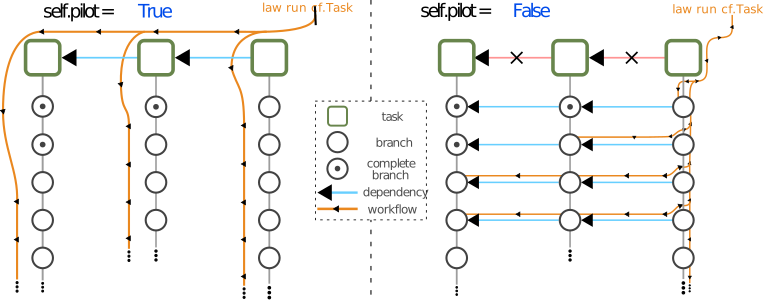
If the desired workflow requires the output of another workflow, the latter will be executed beforehand, which means that all needed branches (with no existing output) from the required workflow will be executed before any of the branches from the current workflow runs (Workflow runs vertically).
This behaviour can be modified, by deactivating the pilot parameter.
In this case, the workflow first run through the branches of the executed task after each other, where all dependencies of each branch are executed when needed by the branch (workflow propagates horizontally).
This is very useful, when parallelising jobs on remote clusters, since multiple branches can run simultaneously, without the need to run all branches from one task beforehand.
Finally, the class attribute reqs, that is a Requirements object, does not directly have to do with the other two requirements, but is rather for analysis-specific configuration.
Strictly speaking, it is not needed for the task to run.
However it offers a container for the requirements, which becomes very convenient when for example a required task should be replaced by a customized subclass of the same task.
Instead of having to edit the requirements in all the class methods that depends on this requirement, the reqs attribute can be simply modified with:
MyTask.reqs.RequiredTask = ModifiedRequiredTask
Therefore, using the class attribute reqs, when working with the requirements within the class is convenient.
RunOnceTask#
The RunOnceTask is a special task that is used to run a task only once, which can be very useful in many situations.
For example, when a task is required by multiple tasks or multiple branches of a workflow, but the task itself should only be executed once independent of the branches, or a task does not produce any file output but is needed to be marked as done (e.g. a task only produces text output on the CLI).
This is implemented by (additionally) inheriting from RunOnceTask.
Moreover, to mark the task as complete, the mark_complete() method is to be added at the end of the run() method after the logic of the task is executed, or the complete run() method is either to be wrapped by the complete_on_success() decorator.
One must be careful with the latter, since the decorator will mark the task as complete even if it fails.
Therefore, it is recommended to also add a check at the end and raise an error in case the task fails.
import law

from columnflow.tasks.framework.base import AnalysisTask

class MyPrintingTask(AnalysisTask, law.tasks.RunOnceTask):

    @law.tasks.RunOnceTask.complete_on_success
    def run(self):
        # Do something here
        if fail:
            raise Exception("this task just failed")

    # Alternative
    def run(self):
        # Do something here
        self.mark_complete()
Add the task to the analysis#
After creating a new task, the law config file in your analysis folder may need to be adjusted, in order to run the task.
If not already there, the folder of the new task has not been added to the [modules] section of the law config file (using python dot path notation).
If the task produces any output, the new task has to be specified under the [outputs] section together with the saving location as follows:
[modules]

path.to.the.tasks.folder

[outputs]

lfn_sources: wlcg_fs_desy_store

hbt.MyNewTask: wlcg
...
Executing the Task#
After new sourcing the law environment or by running law index in a setup enviroment, the task can be executed using the command:
law run cf.MyTask --param1 foo
The parameters can be given using the syntax --param1 foo, where param1 is the name of the parameter and foo is the value of the parameter.
If the parameter’s name include an underscore, the underscore is replaced by a hyphen (--param_1 foo -> --param-1 foo).
If the parameter is a boolean, the parameter can be set to True by only typing --param-bool.
If the parameter is a list, the values can be given as a comma-separated list (--param2 foo,bar,baz).
Custom law.cfg file for users without grid certificate (CMS specific)#
Users, who do not have a grid certificate, are not able to run jobs on the grid or store and fetch data from it. However, they can still run jobs locally. For this purpose, a custom law config file should be created in the analysis folder, which specifies a local dcache and the path to the nanoAODs for every required campaign, and set the output locations for the tasks to local. It is recommended to apply modifications on the config file in a new custom law config file and not directly in the default one. The custom config should inherit from the default config (as shown below) and can be modified as needed by adding or overloading fields.
The custom config file should contain the following sections:
[core]
# inherit from the analysis configuration file
inherit: $HBT_BASE/law.cfg

[local_dcache]
# define path to the local dcache used later for the lfn (Local File Name) sources
base: path/to/different/file/system

[local_campaigns_name]
base: path/to/local/campaigns/nanoAOD/directory

[wlcg_campaigns_name]
base: path/to/local/campaigns/nanoAOD/directory

# define additional settings related to caching when working with this campaign
use_cache: $CF_WLCG_USE_CACHE
cache_root: $CF_WLCG_CACHE_ROOT
cache_cleanup: $CF_WLCG_CACHE_CLEANUP
cache_max_size: 15GB
cache_global_lock: True
cache_mtime_patience: -1

[analysis]

# whether or not the ensure_proxy decorator should be skipped, even if used by task's run methods
skip_ensure_proxy: True

# complementary custom defined modules, which will only be included, when using the custom config file
selection_modules: analysis.selection.{python_module_name}

[outputs]

lfn_sources: local_dcache

# output locations per task family
# for local targets : "local[, STORE_PATH]"
# for remote targets: "wlcg[, WLCG_FS_NAME]"
task_cf.Task1: local
task_cf.Task2: local, /shared/path/to/store/output
task_cf.Task3: /shared/path/to/store/output
...
It is important to redirect the setup to the custom config file by setting the LAW_CONFIG_FILE environment variable in the setup.sh file to the path of the custom config file as follows:
export LAW_CONFIG_FILE="${LAW_CONFIG_FILE:-${ANALYSIS_DIR}/law.nocert.cfg}"
For more details, refer to the law config documentation for more information on the law config file. A template for the custom config file can be found under the dev branch in the repository of the hh2bbtautau analysis.